




Microsoft Fabric comes with two options for storing your data: the Lakehouse and the Warehouse. Or does it?
If you have ever seen a presentation on Microsoft Fabric, you have probably seen one diagram like the one bellow. It shows the major parts of the Fabric service, the multiple compute options and the common storage place for all the computes: the OneLake.
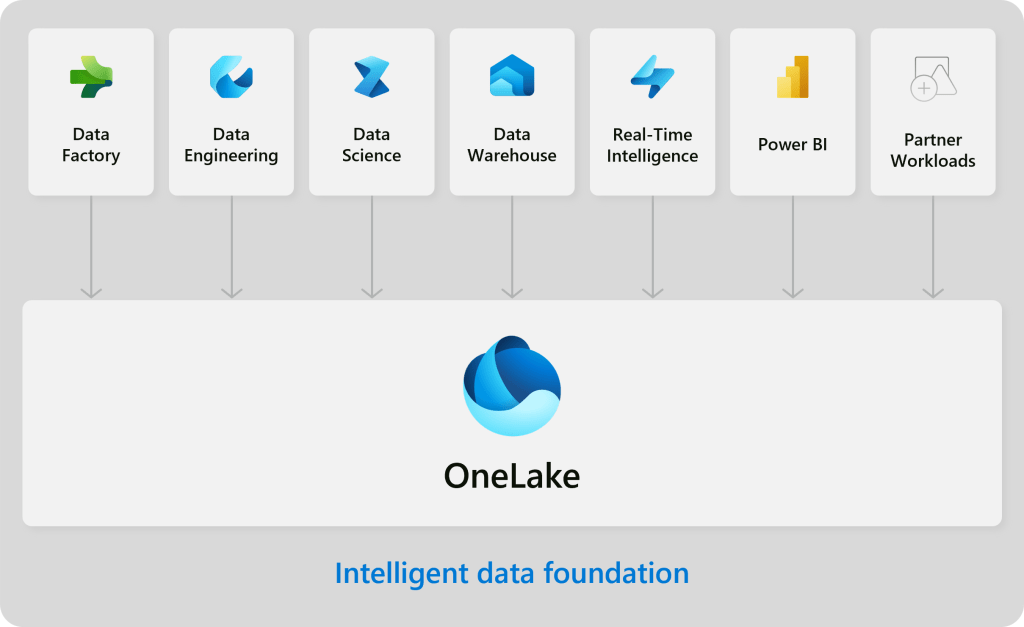
It is a sort of nuance, and it escapes most people I talk to, but as you can see on the diagram above, there is only one place were data is stored. The Lakehouse and the Warehouse are not storage options. Rather, they are computing options on how to write data to OneLake.
Microsoft has selected the Delta Table file architecture, which is based on Apache Parquet file format, as the common file format to share data across all the compute services. Some compute services, like the Real-Time Intelligence, have their own internal storage format, and they spill out their data in Delta Table format when requested or configured to. When they do, they have the data available in OneLake.
Therefore, choosing between the Lakehouse or the warehouse is not a storage choice, but a compute choice. In the sense of “how do you want to organize your delta tables?”.
Delta Tables support many useful features, like ACID transactions on the table, streaming and batch unification, time travel and upserts. But when it comes to performance, the way you organize the underlying parquet files is one of the major factors.
Fabric Lakehouse implements Microsoft’s version of the Spark engine. Data Engineers familiar with this engine will find the ability to design partitions and leverage partition pruning when working with their data, for instance.
On the other hand, Fabric Warehouse (or the official name Synapse Data Warehouse) is based on a specialize version of the SQL Server engine, designed for large data volume and, of course, write data in delta table format, and not in the traditional Synapse distributions or SQL Server data files (mdf, ndf, ldf). As of today, the Fabric Warehouse implements file exclusion technology instead of the Spark data partition technique to improve query performance.
At the end of the day, Lakehouse and Warehouse are choices in Microsoft Fabric to support compute, not storage; therefore, your pick should be guided by:
- Compute library extensibility – the Lakehouse allows for importing 3rd party libraries for PySpark, while the Warehouse works with what is available in the SQL enginee;
- Language familiarity – the Warehouse support a modified version of the very popular T-SQL language, while the Lakehouse support PySpark (Python), Scala and R.
- Environment management – while the Warehouse is pretty much “knob less”, meaning that it doesn’t have many tunning options, making it easier to work with; the Lakehouse has a rich, more complex set of options to configure the runtime environment to execute your code.
Perhaps the most important thing to keep in mind is that, in Fabric, there are no data silos. Regardless of the storage engine you choose, the data there is available to all other engines. Data written to OneLake using the Lakehouse engine is available to Warehouse T-SQL code that needs that data to create a new table, for instance. and vice-versa. This is one of my favorite features in Fabric. Data for everybody, respecting the security definitions.
In summary: data is always kept at the OneLake storage. The Lakehouse x Warehouse option is a compute oriented choice, not a storage related option.
 DataBlog
Leave a comment